The Most Overlooked Crypto Attack, Clipboard Hijacking Explained
Introduction
There's a type of crypto attack that doesn't get nearly enough attention. It doesn't require a fake website. It doesn't need you to sign a malicious contract. It doesn't rely on a compromised social media account or a convincing phishing email. It just needs you to copy a wallet address and paste it somewhere else one of the most routine actions in crypto
It's called clipboard hijacking. It's been draining wallets for years. And it works precisely because nobody thinks about their clipboard as a security vulnerability.
What Clipboard Hijacking Actually Is
Your operating system maintains a clipboard, a temporary storage area that holds the most recent item you copied. When you copy a wallet address, it goes into the clipboard and stays there until you paste it or copy something else.
Clipboard hijacking malware sits silently in the background, monitoring everything that gets copied to your clipboard. The moment it detects a string that matches the format of a crypto wallet address, Bitcoin's base58 structure, Ethereum's 0x prefix, Solana's base58 public key format it replaces that address with an attacker-controlled address.
This entire process happens in milliseconds. There's no notification. No warning. No visual indication that anything has changed. When you paste the address into your transaction field, you paste the attacker's address. When you send the transaction, you send the funds to the attacker. When the transaction confirms on-chain, the funds are gone.
Why This Attack Works So Consistently
Wallet addresses have a specific property that makes clipboard hijacking devastatingly effective: they are long, complex, and impossible to memorize. A typical Solana address is 44 characters of base58-encoded data. An Ethereum address is 42 hex characters. Nobody memorizes these. Nobody types them manually. The entire workflow of sending crypto is built around copy-paste, because the alternative is error-prone manual entry.
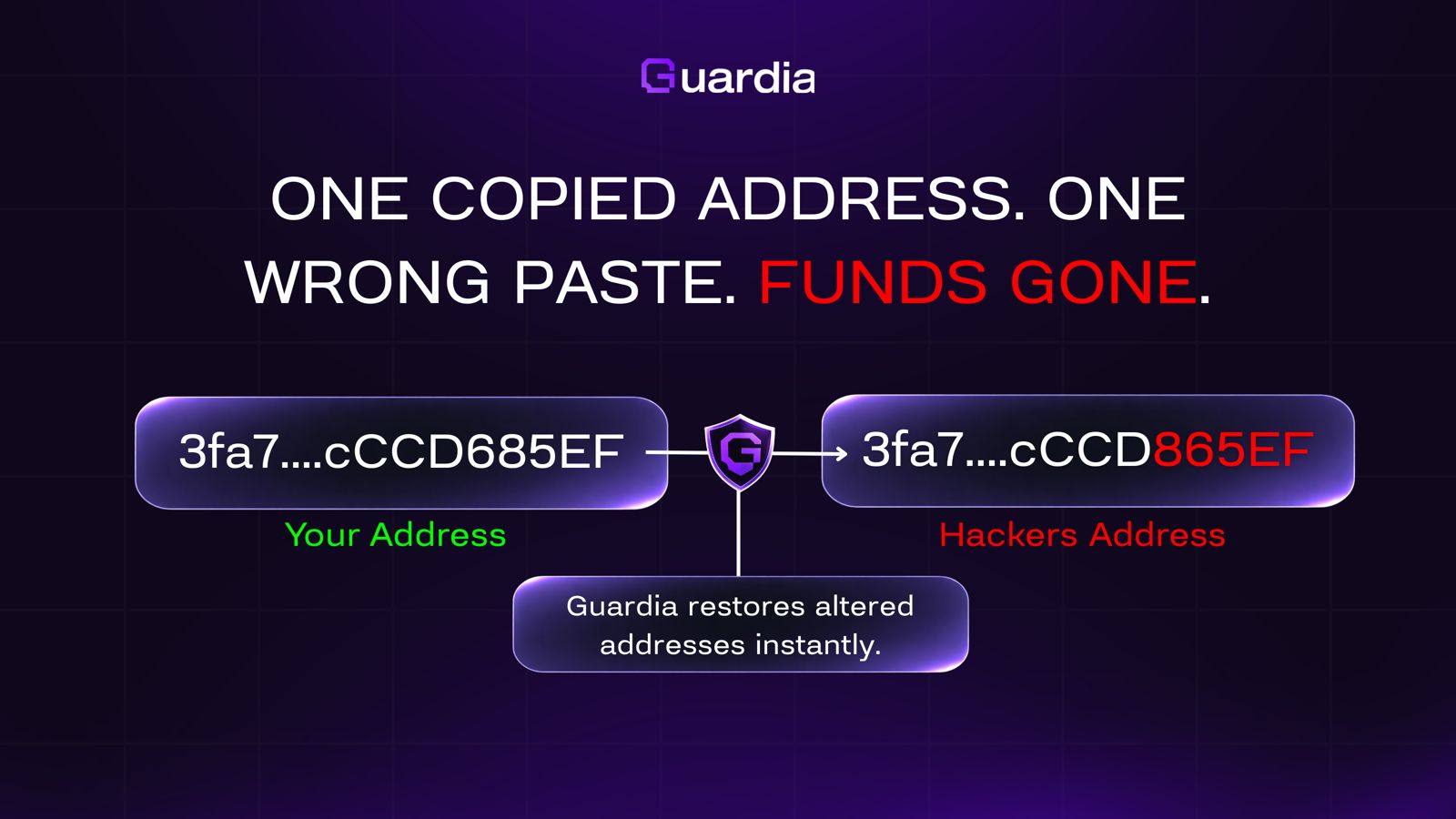
Attackers exploit this workflow assumption. And they exploit a second, equally predictable behavior: most users only verify the first few and last few characters of an address when they check. The attacker generates a 'vanity address', one that shares the first 3-4 and last 3-4 characters of your intended destination address, with attacker-controlled characters in between.
To the glancing eye, the addresses match. To a fast-moving user making a routine transaction, they match. The attack succeeds not because users are careless, but because the attack is specifically designed around the shortcuts humans naturally take when performing repetitive tasks.
How the Malware Gets on Your Device
Clipboard hijackers don't arrive through elaborate exploits. They arrive through the same channels as most malware:
• Malicious browser extensions that request clipboard access permissions — permissions most users grant without reading
• Software downloads from unofficial sources: cracked applications, unofficial wallet clients, 'free' trading tools promoted in crypto communities
• PDF and document attachments from phishing campaigns that execute embedded scripts on open
• Malicious npm packages targeting developers who work with crypto tooling — a significant and growing attack vector
• Compromised software update mechanisms that replace legitimate updates with malware-bundled versions
Once installed, clipboard hijackers are extraordinarily difficult to detect through normal use. They consume minimal resources, produce no visible output, and generate no error states. They simply sit, monitor, and wait for you to copy a crypto address.
Why Traditional Security Misses It
Browser extensions, the most common security tool for crypto users operate at the browser level. They see web requests, DOM content, and browser clipboard events. But clipboard hijacking malware typically operates at the OS level, below the browser's visibility. The extension cannot see what the OS clipboard contains, cannot monitor what happens to clipboard contents between copy and paste, and cannot detect address substitution that happens in OS memory.
Wallet-level transaction warnings can flag some anomalous transactions, but only after you've already pasted the attacker's address and submitted the transaction for signing. At that point, the only protection is if the user manually verifies the full destination address character-by-character, which almost never happens in practice.
Antivirus software may catch known clipboard hijacker signatures, but novel variants and obfuscated versions routinely evade signature-based detection.
The protection gap is real, structural, and specific: no browser-layer tool can monitor OS-layer clipboard events.
Guardia's Clipboard Guardian
Guardia's Clipboard Guardian operates at the OS level, the same level as the malware itself. Rather than monitoring browser events or transaction UI elements, it monitors the actual clipboard contents in real time, at the system layer.
When you copy a wallet address, Guardia records the original address. If clipboard hijacking malware attempts to replace that address before you paste it, Guardia detects the substitution, invalidates the attacker's address, and restores your original. The paste operation delivers what you copied, not what the malware substituted.
This protection is continuous and automatic. It doesn't require you to remember to check. It doesn't require you to compare characters manually. It operates beneath the level of your workflow and handles the threat before it reaches your transaction.
Conclusion
In crypto, one wrong character in a wallet address isn't a typo. It's a complete loss. There's no 'oops, wrong address' support channel. There's no transaction reversal. The blockchain processed exactly what you sent.
Clipboard hijacking works because it targets the most routine action in crypto copy, paste, send and makes that action into a threat vector. The most effective defense isn't awareness or manual verification. It's a security layer that operates at the same system level as the attack itself.
One copied address. One wrong paste. That's all it takes. Guardia ensures that what you paste is always what you copied.
Read other blogs
Stay informed with our latest articles on property protection, security trends, and best practices.